
Amazon Lightning Deals: Find Real Bargains Fast
Fat Kid Deals4 months ago9 min read
Fat Kid Deals may earn from qualifying purchases - more info
Affiliate Disclosure: As an Amazon Associate, Fat Kid Deals earns from qualifying purchases. Prices and availability are subject to change.
We may earn a commission for purchases made through links on the website.
Fat Kid Deals may earn from qualifying purchases - more info
Amazon Lightning Deals are Amazon’s flash-sale style promos: a product gets a limited-time discount, but the number of discounted units is capped. That means the deal can disappear before the timer ends, so the smart move is to find the offer fast, check whether the price is actually good, and buy only if it beats the recent price history.
If you’re trying to save money without getting baited by a countdown clock, this is the workflow that matters: find live deals, verify the price, and skip the ones that only look exciting because they’re moving fast.

Amazon Lightning Deals are short-lived promotions on specific products with a limited number of discounted units. Once the promo inventory is gone, the deal is gone too.
That’s the part shoppers miss most: the timer is only half the story. The real limit is stock, which is why a deal can vanish while the countdown still looks generous.
You’ll usually find these deals alongside other promos on Amazon Today’s Deals or inside Amazon’s broader deals area. The exact label or filter can shift a little by app version or shopping event, but the idea stays the same.
Amazon Lightning Deals work like a race between the timer and the stock meter. You get a discounted price for a set window, but there are only so many promo units available.
A Lightning Deal is both time-limited and quantity-limited. That’s why a bargain can look alive on the page and still disappear before you finish deciding.
For shoppers, that means the only deal worth chasing is one you’ve already decided could be a buy. If you’re still figuring out whether you want the product, the timer usually does the convincing for you, and not in a good way.
Amazon says Lightning Deals usually run from 4 to 12 hours. That sounds like plenty of time, but the useful part of the window may be much shorter if the promo units get claimed quickly.
In other words, don’t confuse the listed duration with a guarantee that you’ll have all afternoon. A popular deal can get scooped up fast, especially in high-demand categories.
A Lightning Deal can end early because the promo inventory sells out. When that happens, the countdown may still be visible, but the discounted price itself is gone.
That’s also why the percent-claimed meter matters more than the clock alone. If the deal is already heavily claimed, the odds of it surviving long enough for you to debate it are lower.
The percent claimed meter shows how much of the promo inventory has already been taken. It doesn’t tell you whether the product is worth buying; it just tells you how much of the discounted stock is left.
If you see Join waitlist, it means 100% of the promotional discounts are currently held in other customers’ carts or have already been used. If a spot opens up, you may get a shot at the deal.
You usually don’t need Prime to shop Lightning Deals, but Prime does help in a couple of ways. Amazon says most Lightning Deals are available to all shoppers throughout most of the year, while Prime members can also get 30-minute early access to eligible Lightning Deals.
Here’s the simple version: most of the year, non-Prime shoppers can still buy Lightning Deals if the stock is there. During Prime Day, those deals are member-exclusive.
To keep the timing straight, Prime Day 2026 ran June 23 through June 26, 2026. During that event, Lightning Deals were reserved for Prime members.
That makes Prime worth considering only if the membership pays for itself for your shopping habits, not just because a countdown is flashing at you.
As of July 1, 2026, U.S. Prime costs $14.99 per month or $139 per year. Amazon also lists lower-cost options for eligible shoppers, including Prime for Young Adults at $7.49 per month or $69 per year after a six-month trial, and Prime Access at $6.99 per month.
If you want to compare plans, the cleanest place to check is Amazon’s current Prime membership pricing and benefits page before you join.
The fastest desktop path starts at Amazon Today’s Deals. From there, look for Lightning Deals or a similar deals filter, then narrow by category if you’re hunting for something specific. If you don't see a "Lightning Deals" filter, you can still see which products have active Lightning Deals if they show a "% claimed" graphic.
If the page feels crowded, that’s normal. Amazon’s deals pages can pack in a lot at once, so the move is to use filters or browse sections instead of scrolling blindly.
A good habit is to search the deals page with a category in mind, like kitchen, electronics, toys, or home goods. That keeps you from wasting time on random promos that don’t fit your list.
On the app, start in the Deals & Savings area and look for Lightning Deals, Browse by, or a deals filter when it appears. The wording can shift by event or app version, so don’t get hung up if the label isn’t identical every time.
If the Lightning Deals filter is buried, tap through Filters or See more and keep going until you find the deal type you want. Amazon’s mobile interface changes enough that a little hunting is part of the game.
The app is also where alerts matter most, since it’s the easiest way to get notified without manually refreshing all day.
The easiest way to catch Lightning Deals earlier is to save products first, then let alerts notify you. Amazon gives you a few different ways to do that, and the best setup depends on whether you’re tracking a specific product or just watching a big sale event.
Add items to a List when you already know you might want them. That gives Amazon something concrete to watch, and it can surface savings when the price drops or a coupon or deal becomes available.
If you use the Amazon app, turn on push alerts. That’s the low-effort way to hear about price movement without treating the deals page like a full-time job.
During major sale events like Prime Day, Amazon lets Prime members create deal alerts in the app based on recent searches and recently viewed items. That’s helpful when you’re watching a broad category instead of one exact product.
For year-round shopping, Lists and price alerts are the steadier tools. On supported product pages, you can also ask Alexa for Shopping to alert you when an item drops to your target price.
Amazon’s price history feature is the cleanest way to tell whether a Lightning Deal is actually worth it. On eligible product detail pages, you can tap Price history or ask Alexa for Shopping to show the item’s 30-day, 90-day, and 365-day pricing context.
That matters because a flashy discount isn’t useful if the item was at the same price last week. If the current deal is barely below the recent norm, the timer is doing more work than the savings.
Big shopping events can produce solid Lightning Deals, but they also create the most pressure. The trick is to decide ahead of time which items are true buys and which ones are just tempting because they’re on a clock.
That’s especially true around Prime Day, Black Friday, and other major sale windows. Prime Day 2026 has already passed, but the lesson is evergreen: event hype can be useful for discovery, not for making rushed decisions.
Price history is the easiest reality check for a Lightning Deal. If the current promo is lower than the recent trend, that’s a much better signal than a countdown alone.
A good rule: if the Lightning Deal price is close to the usual price, skip the hype and wait. If it’s clearly below the recent 90-day range and it’s something you already wanted, that’s when the deal starts to look real.
| Situation | What to do |
|---|---|
| You were already planning to buy the item | Consider buying if the current price beats recent history |
| The deal is only slightly lower than normal | Skip it and keep tracking |
| The product isn’t on your list | Don’t let the timer make the decision |
| The page shows a clear recent low | Buy only if the item solves a real need |
That’s the whole game: buy for the item, not for the animation on the page.
Lightning Deals, coupons, and Best Deals all save you money, but they work differently. The biggest difference is how much urgency Amazon builds into the offer.
| Deal type | How it works | Best for | Watch out for |
|---|---|---|---|
| Lightning Deal | Limited-time offer with limited quantity, usually 4 to 12 hours | Shoppers who already know what they want | Stock can sell out early |
| Coupon | Clip a discount on the product page for a dollar amount or percentage off | Everyday items with easy savings | The savings may be small |
| Best Deal | A sale price that runs for a select number of days | Browsing and comparing over a longer window | It still might not be the lowest recent price |
Coupons are the least frantic because there’s usually no race to click. Lightning Deals can be great, but only when the discount is real and the product was already on your list.
The biggest mistake is assuming the timer means the deal is good. It doesn’t; it only means the deal is limited.
Another common miss is ignoring the waitlist. If it says Join waitlist, the promo inventory is already spoken for, so don’t treat it like a sure thing.
Here are the other traps to avoid:
The best Lightning Deal is the one that was already on your shopping list and gets cheaper at the right moment. Everything else is just a pretty distraction.
A Lightning Deal is a limited-time Amazon promotion on a specific product with a capped number of discounted units. It can end early if the allocated inventory sells out before the countdown expires.
They combine a countdown timer with limited promo stock. Once the discounted inventory is claimed, the deal can disappear even if the timer still has time left.
Amazon says a Lightning Deal can run from 4 to 12 hours, though some end sooner because inventory is limited. If the deal sells out, the discount disappears even if the clock still has time left.
Not usually. Most of the year, Lightning Deals are generally available to all shoppers. Prime members can get 30-minute early access to eligible Lightning Deals, and Prime Day Lightning Deals are member-exclusive.
As of July 1, 2026, in the U.S. Prime costs $14.99 per month or $139 per year. Lower-cost options include Prime for Young Adults at $7.49 per month or $69 per year after a six-month trial for eligible young adults and higher-education students, plus Prime Access at $6.99 per month for qualifying shoppers.
It means 100% of the promotional discounts are currently held in other customers’ carts or have already been used. If a spot opens up, you may get a chance to claim the deal.
Start on Amazon’s Today’s Deals page on desktop or the Deals & Savings area in the app, then look for the Lightning Deals shortcut or filter when it appears.
Not automatically. On eligible product pages, Amazon’s price history feature lets you check 30-day, 90-day, and 365-day context before you buy.

 Glow in the Dark LED Light Up Ball, Rechargeable 6-Color Changing Cowhide...$14.99$21.4230% off
 WART Corn Remover Pads for Feet, 40% Salicylic Acid Wart Remover Pads, Corn...$6.39$7.9920% offToothbrush Holders Wall Mounted with Toothpaste Dispenser & 3 Cups | All-in-One...$18.39$22.9920% off
 Carey STENHydration Backpack Hiking Pack Equipped 2L Water Bag$28.79$31.9910% off
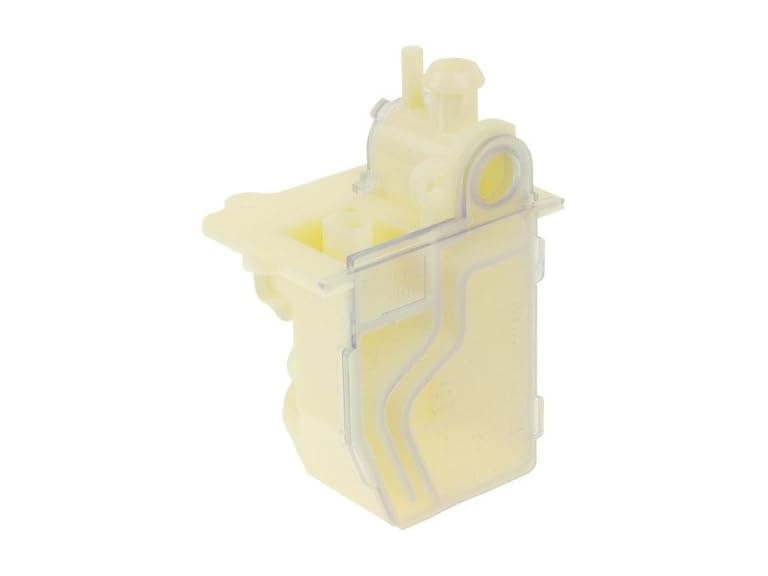 Protech 68-104346-01 Water Trap Condensate Drain$9.99$21.6154% off
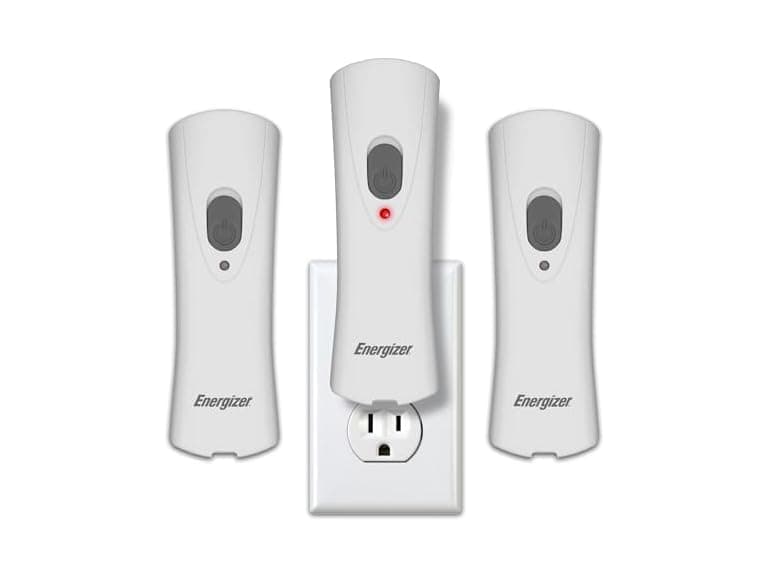 Energizer Weatheready Rechargeable LED Lights 3PK - White$14.99$31.4952% off
 Automatic Robotic Pool Cleaner, 3 in 1$169.99$479.9965% off
 vnilrgle Over Ear Earbuds with Ergonomic Earhook$12.99$43.9970% off
