Fat Kid Deals may earn from qualifying purchases - more info
Menu
Synido USB C Audio Interface for Recording Music, Streaming, Podcasting with XLR, Line Input, 24bit/48kHz, 48V Phantom Power, 2-channel, Silver | Fat Kid Deals
1 / 8
Swipe for more • 1/8
+2
1 / 8
Swipe for more • 1/8
+2
Frequently Asked Questions
The Synido USB C Audio Interface is compatible with USB-C equipped computers and laptops, supporting Windows and macOS systems for recording and streaming.
Yes, it provides 48V phantom power, allowing you to connect and use condenser microphones that require it.
Yes, it features 2 input channels, including XLR and line inputs, enabling simultaneous recording of multiple audio sources.
It supports 24-bit/48kHz audio resolution, delivering high-quality sound suitable for music recording, podcasting, and streaming.
Yes, it offers plug-and-play functionality with USB-C, making it straightforward to set up without needing complex drivers.
Recommended Uses
Home studio recording for musicians and vocalists using XLR microphones.
Live streaming with high-quality audio input for gamers and content creators.
Podcasting setups requiring clear, professional sound with phantom power for condenser mics.
Field recording for interviews or ambient sounds with portable USB-C compatibility.
Voiceover recording for video production and audiobooks.
Connecting instruments and microphones simultaneously for multi-channel audio capture.
Check Price
Amazon
USB C Audio Interface for Recording Music, Streaming, Podcasting with XLR, Line Input, 24bit/48kHz, 48V Phantom Power, 2-channel, Silver
Click For Current Price
Price data is being refreshed. Click below to see the current price on Amazon.
Fat Kid Deals may earn from qualifying purchases – more info
Key Features
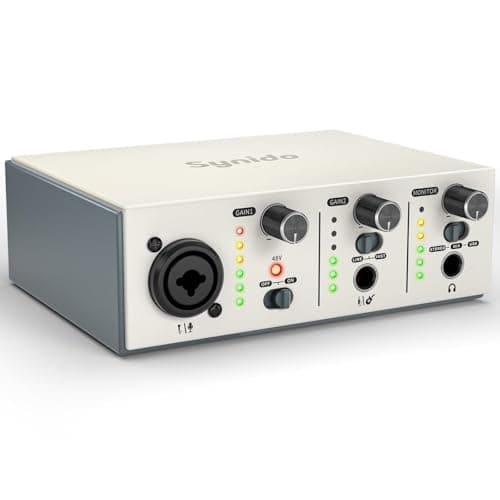
-✔️[High-fidelity sound quality, accurate sampling] The Synido 2x2 audio interface uses a high-quality independent audio chip to reduce recording latency, support 24-bit depth and 48kHz sampling rate, and ensure every detail is restored. Whether it is recording or live broadcasting, it can provide a clear and natural sound quality experience
-✔️[Three monitoring modes, easy to switch] The audio interface provides three monitoring modes to meet different needs. In Stereo mode, independent left and right channels present the original input (such as a microphone or instrument), which is suitable for accurate recording. Mix mode can mix input audio and computer audio in real-time, which is suitable for live broadcast or recording, and is easy to adjust instantly. USB mode only monitors computer audio, which is suitable for post-editing or audio processing. Whether it is recording, live broadcast, or post-production, the three modes can be easily switched to make audio creation more efficient and professional
-✔️[User-friendly design] The audio interface is intuitively designed, and equipped with three independent control areas, and the XLR interface supports 6.35mm and XLR microphones, which are compatible with various devices. The green, orange, and red LED lights display the volume level, helping you to grasp the volume status at any time and avoid distortion. Supports easy switching between Line In and instrument input, adapts to different devices, reduces interference and distortion, and does not need to adjust gain frequently, improving efficiency
-✔️[Professional 48V phantom power] Synido audio interface is equipped with 48V phantom power switch and supports 48V dynamic microphone with excellent noise reduction performance, provides a highly sensitive recording experience, accurately picks up sound, and effectively reduces noise interference, ensuring clear and stable sound quality output
-✔️[Lightweight and portable, plug and play, create at any time] The USB audio interface weighs only 300g and measures 14 x 11.5x 4.5 cm. It is compact and portable and can be taken anywhere anytime. Equipped with a 3.5mm to 6.35mm adapter and a USB-C to USB-A data cable, you can easily use it by directly connecting to your mobile phone or computer
-✔️[Warm Tip] For best compatibility with your DAW and improved audio performance, we recommend downloading a third-party universal ASIO driver before use
Product Details
ASIN
B0DR2SHSD3
Availability
In Stock
Category
Books & Media
Brand
Synido
Frequently Asked Questions
What devices is the Synido USB C Audio Interface compatible with?
The Synido USB C Audio Interface is compatible with USB-C equipped computers and laptops, supporting Windows and macOS systems for recording and streaming.
Does the Synido Audio Interface support phantom power for condenser microphones?
Yes, it provides 48V phantom power, allowing you to connect and use condenser microphones that require it.
Can I record multiple audio sources simultaneously with this Synido interface?
Yes, it features 2 input channels, including XLR and line inputs, enabling simultaneous recording of multiple audio sources.
What is the audio quality of the Synido USB C Audio Interface?
It supports 24-bit/48kHz audio resolution, delivering high-quality sound suitable for music recording, podcasting, and streaming.
Is the Synido Audio Interface easy to set up for beginners?
Recommended Uses
Home studio recording for musicians and vocalists using XLR microphones.
Live streaming with high-quality audio input for gamers and content creators.
Podcasting setups requiring clear, professional sound with phantom power for condenser mics.
Field recording for interviews or ambient sounds with portable USB-C compatibility.
Voiceover recording for video production and audiobooks.
Connecting instruments and microphones simultaneously for multi-channel audio capture.
Key Features
-✔️[High-fidelity sound quality, accurate sampling] The Synido 2x2 audio interface uses a high-quality independent audio chip to reduce recording latency, support 24-bit depth and 48kHz sampling rate, and ensure every detail is restored. Whether it is recording or live broadcasting, it can provide a clear and natural sound quality experience
-✔️[Three monitoring modes, easy to switch] The audio interface provides three monitoring modes to meet different needs. In Stereo mode, independent left and right channels present the original input (such as a microphone or instrument), which is suitable for accurate recording. Mix mode can mix input audio and computer audio in real-time, which is suitable for live broadcast or recording, and is easy to adjust instantly. USB mode only monitors computer audio, which is suitable for post-editing or audio processing. Whether it is recording, live broadcast, or post-production, the three modes can be easily switched to make audio creation more efficient and professional
-✔️[User-friendly design] The audio interface is intuitively designed, and equipped with three independent control areas, and the XLR interface supports 6.35mm and XLR microphones, which are compatible with various devices. The green, orange, and red LED lights display the volume level, helping you to grasp the volume status at any time and avoid distortion. Supports easy switching between Line In and instrument input, adapts to different devices, reduces interference and distortion, and does not need to adjust gain frequently, improving efficiency
-✔️[Professional 48V phantom power] Synido audio interface is equipped with 48V phantom power switch and supports 48V dynamic microphone with excellent noise reduction performance, provides a highly sensitive recording experience, accurately picks up sound, and effectively reduces noise interference, ensuring clear and stable sound quality output
-✔️[Lightweight and portable, plug and play, create at any time] The USB audio interface weighs only 300g and measures 14 x 11.5x 4.5 cm. It is compact and portable and can be taken anywhere anytime. Equipped with a 3.5mm to 6.35mm adapter and a USB-C to USB-A data cable, you can easily use it by directly connecting to your mobile phone or computer
Product Details
ASIN
B0DR2SHSD3
Availability
In Stock
Category
Books & Media
Brand
Synido
Yes, it offers plug-and-play functionality with USB-C, making it straightforward to set up without needing complex drivers.
-✔️[Warm Tip] For best compatibility with your DAW and improved audio performance, we recommend downloading a third-party universal ASIO driver before use

 10% OFF