Fat Kid Deals may earn from qualifying purchases - more info
Menu
30% Off - Stylus Pen for iPad (2018-2025) Fast Charging, Tilt Sensitivity, Comfort Grip, Palm Rejection for iPad 11/10/9/8/7/6th Gen, Air 7/6/5/4/3/M3/M2, Pro 13"/12.9"/11"/M4, Mini 7/6/5th, Perfect for Drawing | Fat Kid Deals
30% OFF
1 / 8
Swipe for more • 1/8
+2
30% OFF
1 / 8
Swipe for more • 1/8
+2
Frequently Asked Questions
Yes, it supports iPad models from 2018 to 2025, including iPad Pro, Air, Mini, and standard iPads listed in the product description.
No, it does not support pressure sensitivity but offers tilt sensitivity and high responsiveness for varying line thickness.
It charges fully in 20 minutes and provides up to 10 hours of continuous use, with a 4-level battery indicator.
No Bluetooth is required; simply double-tap the top to power on or off. You may need to disconnect Apple Pencil Bluetooth if issues occur.
Yes, it has palm rejection technology and an ergonomic grip designed to reduce hand fatigue for extended use.
Recommended Uses
Digital artists creating sketches and paintings on their iPads with tilt-sensitive line control.
Students taking handwritten notes with palm rejection to avoid accidental marks.
Professionals annotating and marking up documents during meetings or presentations.
Designers drafting precise layouts or architectural plans using the ergonomic grip for comfort.
Casual users navigating their iPads and jotting down quick memos without Bluetooth pairing hassle.
Educators preparing interactive lessons and illustrations for remote or in-class teaching.
Hopezone
Stylus Pen for iPad (2018-2025) Fast Charging, Tilt Sensitivity, Comfort Grip, Palm Rejection for iPad 11/10/9/8/7/6th Gen, Air 7/6/5/4/3/M3/M2, Pro 13"/12.9"/11"/M4, Mini 7/6/5th, Perfect for Drawing
$8.38$11.97Save $3.59
Fat Kid Deals may earn from qualifying purchases – more info
Key Features
-【Compatible with iPad & iPad Pro (2018-2025)】This iPad pencil is designed for a wide range of iPads, including iPad Pro 13" (M4), iPad Pro 12.9" (3/4/5/6), iPad Pro 11" (all generations), iPad Air M3/M2/5/4/3, iPad 11/10/9/8/7/6, and iPad Mini 6/5. Be sure to check your device before purchasing, as this pencil is not compatible with other models.
-【Tilt Sensitivity + High Responsiveness】Experience smooth, precise writing with no lag/offset/breaking point. The advanced design allows for different line thicknesses based on the pencil's tilt angle, enhancing your writing and drawing freedom. This pencil does not support pressure sensitivity, but it offers superior responsiveness compared to passive styluses. Additionally, 3 replacement tips are included for convenience.
-【Palm Rejection + Ergonomic Grip】Equipped with palm rejection technology, this stylus pen ensures natural, uninterrupted writing and effortless interaction with your screen. The ergonomic grip is designed to reduce hand fatigue and provide a comfortable, non-slip hold, making it ideal for long hours of use.
-【Magnetic Attraction+ Energy-Saving Mode】The built-in magnet allows you to securely attach the stylus pen to your iPad, including the iPad 10, for easy storage and to prevent loss. Even with the included stylus pen grip, the magnetic feature remains effective. The energy-saving design automatically powers off the iPad pencil after 5 minutes of inactivity, ensuring battery longevity.
SAVE 30%
$8.38$11.97
-【Fast Charging & 4-Level Battery Indicator】Fully charge in just 20 minutes for up to 10 hours of continuous use. The stylus pen features a 4-level battery indicator: All 4 lights: 75%-100%, 3 lights: 50%-75%, 2 lights: 25%-50%, 1 light: 5%-25%, Flashing light: Below 5%, time to recharge.
-【Easy Power On/Off】No Bluetooth needed! Simply double-tap the top of the stylus pen to turn it on or off. If it’s not working after being turned on, turn off Bluetooth in your iPad settings and disconnect from the Apple Pencil Bluetooth connection for a smooth experience.
-【What’s in the Box】1 Smart Stylus, 1 Type-C Charging Cable, 3 Replacement Tips, 1 Ergonomic Grip, 1 User Manual. For any product inquiries, feel free to contact us.
-Note: Follow the steps to disconnect the Bluetooth connection between your iPad and Apple Pencil: Settings > Bluetooth > Apple Pencil > tap "i" > Forget this device.
Product Details
ASIN
B0FKXSC1ML
Availability
In Stock
Category
Electronics & Tech
Brand
Hopezone
You May Also Like
24% OFF
Kids Bluetooth Headphones, 85/94dB Volume Limiter, Foldable Wireless Over-Ear...

 24% OFF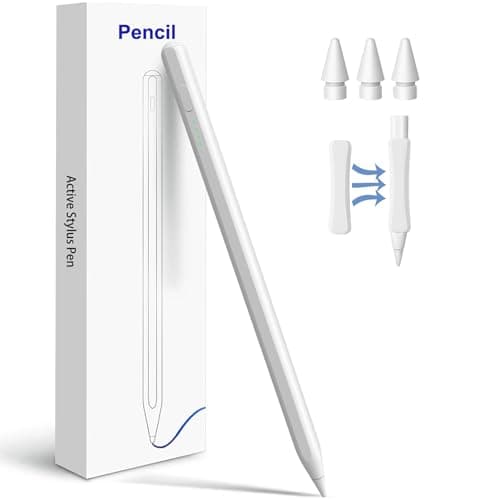
 30% OFF
 40% OFF
 50% OFF
 20% OFF
 10% OFF