Fat Kid Deals may earn from qualifying purchases - more info
Menu
SCREENOVATE 10.1" Digital Wall Planner Alternative, Smart Touchscreen Family Calendar, Auto-Sync with iCloud/Google/Outlook, Chore Chart, Meal Planner for Desk or Shelf Use | Fat Kid Deals
1 / 8
Swipe for more • 1/8
+2
1 / 8
Swipe for more • 1/8
+2
Frequently Asked Questions
It can automatically sync with iCloud, Google Calendar, and Outlook calendars for unified scheduling.
Yes, you can assign different colors and tasks to each family member, and authorize multiple devices to access and manage the calendar.
Yes, it features an interactive chore chart and a meal planner to organize housework and dinner plans for the whole family.
Absolutely, setup is simple—just plug it in, connect to Wi-Fi, and link your calendar via the Mobile App for automatic syncing.
Yes, when not displaying the calendar, it transforms into an elegant digital picture frame showcasing your family photos on the 10.1" touchscreen.
Recommended Uses
Organizing and coordinating busy family schedules with color-coded tasks for each member.
Managing and motivating children's chores through an interactive and visual chore chart.
Planning weekly meals and displaying dinner menus to streamline family mealtime decisions.
Syncing multiple calendars from iCloud, Google, and Outlook for a unified family calendar accessible from anywhere.
Using the device as an elegant digital photo frame to display family photos when not in calendar use.
Keeping track of grocery lists and daily errands via the integrated mobile app for efficient household management.
SAVE 9%
$49.99$54.90
Amazon
10.1" Digital Wall Planner Alternative, Smart Touchscreen Family Calendar, Auto-Sync with iCloud/Google/Outlook, Chore Chart, Meal Planner for Desk or Shelf Use
$49.99$54.90
Fat Kid Deals may earn from qualifying purchases – more info
Description
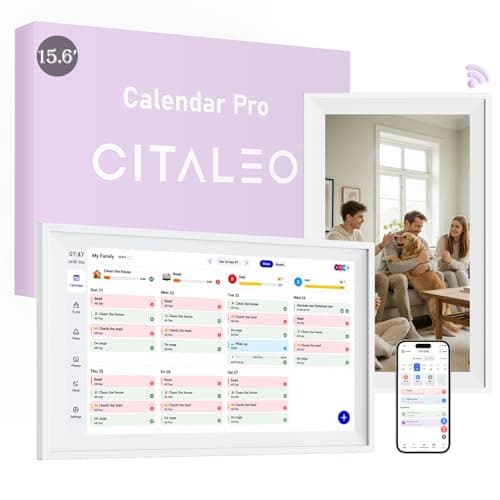
•【All-In-One Smart Family Calendar】:digital frame effortlessly organizes and tracks every family schedule with the crystal-clear 10.1" touchscreen. Assign different colors and tasks to each family member, making family scheduling simpler and more intuitive.
•【Easy Setup and Auto-Sync】: Enjoy a user-friendly design that our smart picture frame allows for quick setup—just plug in, connect to Wi-Fi, and link your calendar to the Mobile App. Once synced, it seamlessly integrates multiple personal calendars (iOS, Google, etc.) into one unified interface. Authorize additional devices for even greater convenience.
•【Interactive Chores Chart & Dinner Planner】: Our digital calendar keeps housework organized and motivates family members, especially children, to develop healthy habits with an interactive chore chart. Display your family dinner plans to keep everyone informed and eliminate the daily "What's for dinner?" question.
•【Manage from Anywhere】: Stay connected with the powerful eCalendar App. Access and manage your calendar on the go, with free features like a photo frame, chore chart, dinner plan, grocery list, and more. Paid functions like Magic Import offer advanced tools tailored for users with special needs.
•【Elegant Digital Picture Frame】: Transform your smart calendar into a stunning digital picture frame when not in use. Display cherished family photos on the clear touchscreen, bringing a touch of sophistication to any room as contemporary home decor.
Product Details
ASIN
B0GY84HC3R
Availability
In Stock
Category
Office & School
Brand
SCREENOVATE
Frequently Asked Questions
What calendars can the SCREENOVATE 10.1" Digital Wall Planner sync with?
It can automatically sync with iCloud, Google Calendar, and Outlook calendars for unified scheduling.
Can multiple family members use the SCREENOVATE Family Calendar simultaneously?
Yes, you can assign different colors and tasks to each family member, and authorize multiple devices to access and manage the calendar.
Does the planner include tools to help manage household chores and meals?
Yes, it features an interactive chore chart and a meal planner to organize housework and dinner plans for the whole family.
Is the SCREENOVATE planner easy to set up and use?
Absolutely, setup is simple—just plug it in, connect to Wi-Fi, and link your calendar via the Mobile App for automatic syncing.
Can I use the SCREENOVATE planner as a digital photo frame?
Recommended Uses
Organizing and coordinating busy family schedules with color-coded tasks for each member.
Managing and motivating children's chores through an interactive and visual chore chart.
Planning weekly meals and displaying dinner menus to streamline family mealtime decisions.
Syncing multiple calendars from iCloud, Google, and Outlook for a unified family calendar accessible from anywhere.
Using the device as an elegant digital photo frame to display family photos when not in calendar use.
Keeping track of grocery lists and daily errands via the integrated mobile app for efficient household management.
Description
•【All-In-One Smart Family Calendar】:digital frame effortlessly organizes and tracks every family schedule with the crystal-clear 10.1" touchscreen. Assign different colors and tasks to each family member, making family scheduling simpler and more intuitive.
•【Easy Setup and Auto-Sync】: Enjoy a user-friendly design that our smart picture frame allows for quick setup—just plug in, connect to Wi-Fi, and link your calendar to the Mobile App. Once synced, it seamlessly integrates multiple personal calendars (iOS, Google, etc.) into one unified interface. Authorize additional devices for even greater convenience.
•【Interactive Chores Chart & Dinner Planner】: Our digital calendar keeps housework organized and motivates family members, especially children, to develop healthy habits with an interactive chore chart. Display your family dinner plans to keep everyone informed and eliminate the daily "What's for dinner?" question.
•【Manage from Anywhere】: Stay connected with the powerful eCalendar App. Access and manage your calendar on the go, with free features like a photo frame, chore chart, dinner plan, grocery list, and more. Paid functions like Magic Import offer advanced tools tailored for users with special needs.
•【Elegant Digital Picture Frame】: Transform your smart calendar into a stunning digital picture frame when not in use. Display cherished family photos on the clear touchscreen, bringing a touch of sophistication to any room as contemporary home decor.
Product Details
ASIN
B0GY84HC3R
Availability
In Stock
Category
Office & School
Brand
SCREENOVATE
Yes, when not displaying the calendar, it transforms into an elegant digital picture frame showcasing your family photos on the 10.1" touchscreen.

 17% OFF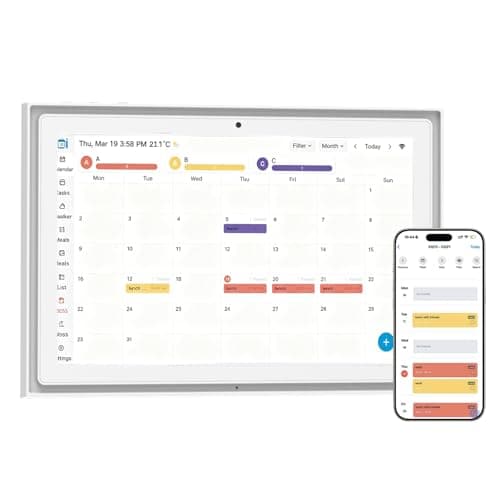
 50% OFF
 50% OFF