Best Printer Cleaning Kit for Epson, HP | Brother Inkjet Printhead Cleaning Kit | Inkjet Printer Head Cleaner | Printer Head Cleaning Kit with LARGE 20ml Syringe - 100ml Printer Cleaning Fluid | Fat Kid Deals
Amazon · Best Printers
Best Printer Cleaning Kit for Epson, HP | Brother Inkjet Printhead Cleaning Kit | Inkjet Printer Head Cleaner | Printer Head Cleaning Kit with LARGE 20ml Syringe - 100ml Printer Cleaning Fluid
As an Amazon Associate, we earn from qualifying purchases.
Editor's note
Customers find the cleaning kit works great and recommend it, with one mentioning it fixed their printer problem.
Product details
Details
Brand
Best Printers
Item form
Liquid
Size
3.38 Fluid Ounces
Dimensions
5 x 2 x 2 inches
Sold by
BestPrintersLLC
UPC
309780988806
ASIN
B07K1B4GSJ
1 / 6
Know before you buy
Item highlights
High Success Rate: Save hundreds of dollars with our best printing cleaning kit for restoring print quality on inkjet printers. Access additional video support of the best printers cleaning kit on YouTube Channel. Remem…
User-Friendly Design: DIY Print Head Cleaning Kit for Epson. No expertise is required! This cleaning kit fixes common printing issues like discoloration, missing colors, low-quality prints, blank pages and streaks
Wide Compatibility: Works with popular printer models, including Epson EcoTank, Epson WorkForce HP SmartTanks, HP OfficeJet, Canon Pixma, Brother MFC, DTF, Sublimation and many more.
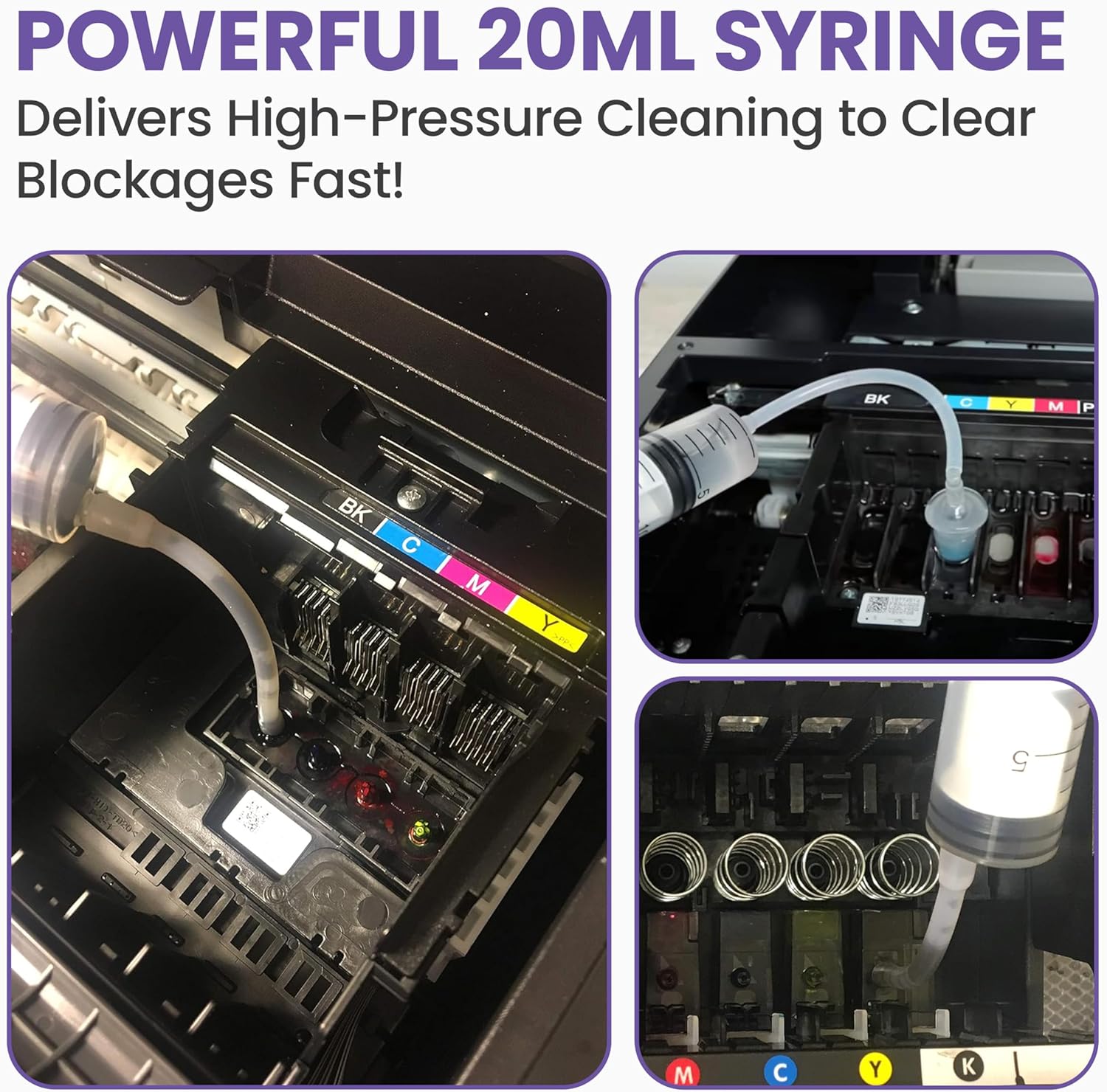
Complete Cleaning Solution: Includes a LARGE 20ml print head cleaner syringe and multiple attachments for hp officejet printhead cleaning kit. Our ionized cleaning solution is safe to use on all printer components
Complete Printhead Cleaning Solution: Includes specialized cleaning fluid, syringes, and tools; printer cleaning kit flush cleaner removes dried ink buildup; extends printhead lifespan and delays replacement
Keep in mind
Returns: FREE refund/replacement until Jan 31, 2027
Directions: Print a nozzle check pattern to identify which colors need cleaning.Print a nozzle check pattern to identify which colors need cleaning. Warm the cleaning fluid slightly and remove the ink cartridges. If possible, remove the printhead. Connect the silicone tubing from the syringe to the printer nozzle and slowly inject the cleaning fluid. Repeat as needed. Clean the area and ensure it is completely dry before reassembling the printer. Leave the printer off for 24 hours to allow drying. After 24 hours, power on the printer and run a printhead or nozzle cleaning cycle several times. Print a test page to verify that all colors have returned.
Safety: Allow at least 24 hours for the printer to dry before turning it on to prevent damage. Use the cleaning kit only after trying the built-in cleaning function.Allow at least 24 hours for the printer to dry before turning it on to prevent damage. Use the cleaning kit only after trying the built-in cleaning function. Keep out of reach of children. Eye protection is recommended during use.